Hey there, let’s cut to the chase—losing your computer lock key is way more stressful than it sounds, right? Especially when that lock’s tied to your work laptop, a personal gaming rig with all your stored designs, or even a kid’s school computer you borrowed for a project. I’ve been deep in the computer locks game for years, and trust me, I’ve seen every scenario: the guy who dropped his key down a restaurant drain, the freelancer who stuffed theirs in a jacket pocket that got donated to goodwill, even the IT team member who locked a whole cabinet of company devices before realizing his key was gone. Computer Locks
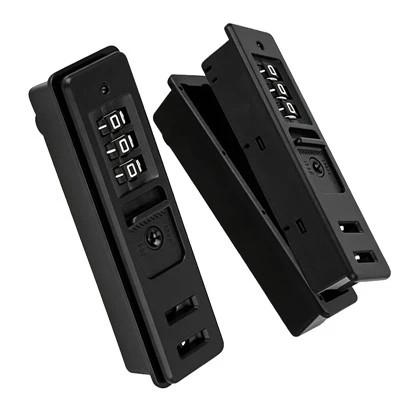
First off, don’t panic. This isn’t a “you’re out of luck” situation. Let’s walk through the step-by-step stuff I’ve helped customers with a hundred times, plus the pro tips only a lock supplier would know.
First 10 Minutes: Double-Check That It’s Really Gone
When you realize your key is MIA, your first instinct is to tear your space apart—but slow down. I’ve had so many people come back to me later like, “Oh! I stuck it in my laptop charger port that I set on the counter!” or “It was in the glove box of my car, not my work bag.” Check these random spots first: the seams of your laptop bag, between couch cushions, the inside of your jacket’s inner pocket, even the little tray in your car’s cup holder. A lot of times, keys get stuck in places you don’t think to look because we’re rushing. If it turns up here, great—you’re done. If not, move to the next step.
Step 1: Grab Your Lock’s Numbered Tag
Here’s a thing most people don’t know: when you buy a computer lock from a reputable supplier (hey, that’s us), every lock set comes with a small metal tag that has a unique code printed on it. It’s not just a random number—it’s the key code for that exact lock. I can’t tell you how many customers skip saving this tag, then spiral because they can’t get a replacement key. If you still have that tag, this is the easiest path by far. You don’t have to hunt for a locksmith, you don’t have to break the lock, you just reach out to someone who specializes in computer locks (again, that’s us) with that code, and we can cut a matching key for you in a matter of days—sometimes even same-day, depending on how busy we are.
Pro tip from our team: If you toss that tag, you’re basically throwing away a lifeline. I tell every customer to tape that tag to the bottom of their laptop, or save a photo of it in their phone, so if the worst happens, they’ve got the code ready. I’ve seen people tape it to the back of their lock case too—double safe.
Step 2: No Tag? Don’t Stress—We Can Still Help
If you lost both the key and the numbered tag, that doesn’t mean you have to replace the whole lock or your laptop. We’ve got tools and methods to figure out what key your lock uses, but it takes a little time. First, confirm what kind of lock you have: most computer locks are either a standard Kensington lock (the most common one, with that slim slot on the side of most laptops) or a variation like a Noble Lock for high-security devices. The process is similar for both, but the key blanks are a little different.
First, make sure you didn’t buy a universal lock set. A lot of cheaper universal locks use keys that work for dozens of the same brand, but those are hit-or-miss. If you have a universal lock, you can test a few generic keys (they’re sold online for like $5) to see if one fits—no harm in that, right? But if it doesn’t, or if you have a custom lock, move to the next step.
We use what’s called a “key decoder” for computer locks, which lets us identify the cut patterns on your lock’s cylinder without having to pick it open. This isn’t something a regular locksmith will have—most general locksmiths work on doors and cars, not laptop locks, so they’ll either tell you to replace the lock or drill it out. Drilling is a last resort, and it can damage your laptop’s port (which sucks, because then you’re out a lock and have to get the port repaired too). We avoid drilling whenever possible, because we want you to keep your lock and not mess up your device.
Another option if you have a lock with a combination feature? Wait, did you set a combination when you first locked it? Some laptop locks are key-and-combo, so if you remember the combo, you can just reset it. If you forgot, most combos have a reset button on the lock itself—you hold it down for 10 seconds, enter a new combo, and you’re good. I know, it’s easy to mix up the combo when you’re only using keys, so that’s another thing to note: next time, if you lose a key, use the combo instead for backups.
Step 3: What If You Have to Remove the Lock?
Sometimes, even after all that, the lock is stuck and you can’t get a key or combo to work. Then, you might need to remove the lock without damaging your laptop. Let’s talk about that, because I’ve seen people break their laptops trying to pry the lock off.
First, never use a flathead screwdriver to pry the lock out. That can scratch your laptop’s casing or even break the port. A better trick: get a pair of small needle-nose pliers, grip the metal part of the lock (the part that’s inserted into the laptop), and twist gently. Most computer locks are made with a thin metal tab that holds them in place, so twisting that tab will loosen it enough to pull it out. If that doesn’t work, you can use a plastic spudger (the kind you use to open phone cases) to work the lock out from the side—again, don’t force it. If all else fails, a small drill with a tiny bit (like a 1/16 inch bit) will work, but only drill the metal part of the lock, not the laptop. We always recommend drilling as a last step, because it’s the only way that’s super low-risk for your device.
Once the lock is removed, you don’t have to get a new one right away, but I’d suggest it if you’re going to leave your laptop unattended. Most people who lose a key end up either getting a replacement key or a new lock set, because it’s way cheaper than replacing a stolen laptop or a hard drive full of work.
Common Mistakes to Avoid (I’ve Seen These Too Many Times)
Let’s get real—here are the mistakes that cost people extra time and money, so don’t do these:
- Don’t buy a random replacement key online. A lot of sellers on sites like auction platforms will sell “universal Kensington keys” that don’t fit your specific lock. We’ve had customers send us keys they bought that don’t work, then come to us for a real one. Stick to a supplier that specializes in computer locks, not random third parties.
- Don’t break the lock yourself. Prying or drilling without knowing what you’re doing can damage your laptop. It’s easier and cheaper to get a pro who works with these locks to help.
- Don’t throw the lock’s tag away. Seriously—this is the most important thing. I can’t count how many times a customer came to me a week after losing their key, panicking because they tossed the tag with the code on it. Taping it to your laptop is a $0 move that saves you so much hassle.
- Don’t wait to replace the key. A lot of people think, “I’ll just use this laptop all week and deal with it later,” but if you misplace the key, it’s not just your laptop you’re worried about—if someone finds it, they can lock up your device or steal data. Don’t leave it unresolved for more than a couple days.
When You Should Replace the Entire Lock
Wait, when is replacing the whole lock better than just getting a new key? Let’s be honest: if your lock is old, or if you had to drill it out to remove it, it’s probably worn out anyway. Most computer locks are designed to last 3-5 years of regular use, so if yours is that old, getting a new set is a good call. Also, if you’re sharing laptops with other people, getting a new lock means everyone has unique keys, so you don’t have to worry about someone else’s key working on your lock. High-security settings—like if you’re handling confidential work files—might also benefit from a new lock with a different key code, just for extra security.
Quick Scenario Breakdowns (So You Know Exactly What to Do)
Let’s make this concrete, because different situations call for different moves:
- Scenario 1: I have a lock tag, lost key. Outcome: Reach out to a computer lock supplier, send them the code on the tag, get a replacement key in 1-3 days. No extra cost, no damage.
- Scenario 2: No tag, but lock is a standard Kensington. Outcome: We use a key decoder to find the cut code, make a custom key, or if that’s not working, help you remove the lock without damaging your laptop.
- Scenario 3: Combination lock, forgot combo. Outcome: Find the reset button (usually on the end of the lock, near the key slot), hold it for 10 seconds, enter a new combo, done.
- Scenario 4: Lock is stuck, can’t remove it. Outcome: Use needle-nose pliers to twist the lock free; if that fails, drill the metal part of the lock (not the laptop) to remove it.
Now, the big picture: Losing a computer lock key isn’t a disaster, but it is something to handle smartly. You don’t have to overpay for locksmith services or risk your laptop’s hardware. At the end of the day, the best move is to have a plan before it happens—save that lock tag, keep a photo of the key code, and if you ever misplace a key, reach out to a supplier that knows computer locks inside and out.
If you’re in this spot right now, or just want to stock up on replacement keys, new lock sets, or extra lock tags for your team, don’t hesitate to reach out to us. We’ve helped thousands of people get back up and running fast, no hassle, no hidden fees. We can walk you through every step, answer any questions you have, and get you a replacement key in no time.
Computer Locks References
- Electronic Frontier Foundation. (2021). "Physical Security for Laptops: Protecting Your Device from Theft." EFF Guides for Digital Privacy.
- Computer Lock Manufacturers Association. (2022). "Best Practices for Laptop Lock Key Replacement and Management." Industry Standards for Computer Peripheral Security.
- TechLock Inc. (2023). "Troubleshooting Lost Keys for Kensington and Noble Locks: Supplier-Guided Solutions." Internal Technical Documentation for Computer Lock Replacement Services.
Zhejiang Tongtai Lock Co., Ltd.
We are one of the most professional computer locks manufacturers and suppliers in China, also support customized service. Please feel free to wholesale bulk high quality computer locks in stock here from our factory. Welcome to contact us for quotation.
Address: No.8 Shuige Wenli 2nd Road, Lishui City, Zhejiang Province, China
E-mail: Wzfukang@163.com
WebSite: https://www.tongtailock.com/
