Hey everyone, 5G CPE
Let’s cut to the chase: if you’re a remote worker who’s ever dealt with a spotty office Wi-Fi that cuts out mid-Zoom, a home broadband plan that caps your data right when you’re uploading a big project file, or a coffee shop public network that’s so slow you’d be better off using a dial-up modem, this post’s for you. As a 5G CPE supplier, I get asked this question all the time: is 5G CPE actually worth it for remote work, or is it just another tech hype gadget that never lives up to the marketing? Spoiler: it’s not just hype, but it’s not for every remote worker either. Let’s break this down like we’re chatting over a coffee (or a energy drink, no judgment—we’ve all been there for a 2AM deadline).
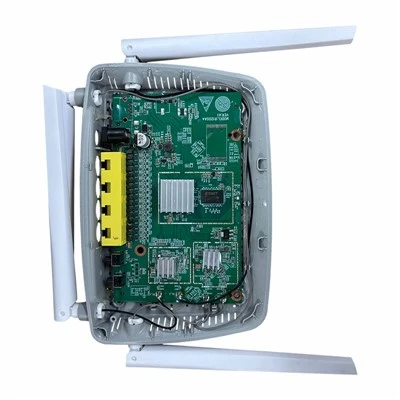
First, let’s make sure we’re on the same page about what a 5G CPE even is. CPE stands for Customer Premises Equipment, and a 5G CPE is basically a box that turns 5G cellular signals from your carrier into a solid Wi-Fi network for your home, small office, or even a mobile workspace. Think of it like a super-powered home router, but instead of plugging into a fiber line or cable line, it connects to the 5G tower nearest you. No digging, no waiting weeks for an installer to run cable—just plug it in, scan for the 5G signal, and you’re online in 5 minutes. That’s a huge win for remote workers who might move a lot (like if you’re a digital nomad crashing in a different city every month) or live in an area where fiber is “coming soon” but has been for 3 years.
Now, let’s talk remote work pain points. I’ve seen so many remote workers skip job offers or turn down promotions because their home internet is garbage. Let’s list the big ones: video call lag that makes you miss half your manager’s explanation, uploads that take 2 hours for a 1GB work file, data caps that force you to pause streaming (and work) during peak hours, and dead zones so you have to camp next to a window to get a signal. Here’s where 5G CPE steps in.
First, speed. 5G isn’t just “faster than 4G”—it’s night and day. For remote work, you need enough speed for multiple things at once: a Zoom call, a cloud backup running, a Slack bot that’s syncing, maybe even a quick Google Drive download. The average 5G CPE delivers download speeds between 100 Mbps and 1 Gbps, and upload speeds around 50 Mbps to 100 Mbps. Compare that to the average US home broadband, which is around 180 Mbps download but only 20 Mbps upload. Wait, upload is a big one—most remote workers don’t realize how important upload speed is. If you’re presenting on Zoom, sharing your screen, or uploading a design file to your company’s cloud, slow uploads make you look like you’re frozen mid-sentence, which is not great for your reputation. I’ve had a customer tell us their old 4G CPE took 45 minutes to upload a 10-minute video clip for a client; with their 5G CPE, it took 2 minutes. That’s the kind of win that makes remote work actually work, no excuses.
Next, reliability. 5G uses a different kind of network than 4G: it has smaller cell towers (called small cells) that are closer to you, which means less congestion. If you live in a suburb with hundreds of people on the same 4G tower during dinner time (when everyone’s streaming Netflix and Zooming), that 4G speed can drop to 10 Mbps. With 5G, especially mid-band 5G (which is the sweet spot for most residential and small business use), the network can handle more devices without slowing down. I’ve seen customers switch from cable that cuts out 2-3 times a week to 5G CPE that’s gone 6 months without a drop. That’s a game-changer for people who can’t afford to lose work hours because their internet died right before a deadline.
Then there’s data caps. A lot of standard home broadband plans have soft or hard data caps: if you go over, your speed gets throttled, or you pay steep overage fees. For remote workers who use 50-100 GB of data a month (some even more if they’re uploading large files or using cloud-based software), those caps add up fast. 5G plans for CPE often have unlimited data—no throttling, no overage fees. I had a customer who used to pay $80 a month for cable with a 100 GB cap and $15 overages for anything extra; now they pay $60 a month for unlimited 5G, saving $360 a year. That’s money they can put toward a better desk or a nicer chair, which is also key for remote work.
But wait, it’s not all perfect. Let’s be real—5G CPE isn’t for everyone. The biggest catch is 5G coverage. If you live in a rural area where the nearest 5G tower is 10 miles away, that signal will be weak, and your 5G CPE might not perform better than a good 4G CPE. I once had a customer in a small town in the Midwest who tried our 5G CPE, but his only signal was low-band 5G, which is really slow and unreliable. He ended up switching back to his old cable. So if you’re in a super rural area, check your carrier’s 5G coverage map first—don’t just buy a CPE and hope for the best.
Another thing: latency. Latency is the time it takes for a signal to go from your device to the tower and back. For Zoom calls, latency under 100 ms is good, under 50 ms is great. 5G latency is usually around 20-50 ms, which is perfect for remote work. But if you’re on low-band 5G, latency can jump to 100+ ms, which makes calls feel choppy. Also, if you’re using gigabit 5G speed, make sure your devices support Wi-Fi 6 or Wi-Fi 6E—older Wi-Fi 5 routers won’t be able to handle that speed, so you’ll be wasting the 5G’s potential. I always tell customers: if you’re getting a 5G CPE, make sure your laptop, phone, etc., are up to date with their Wi-Fi standards, otherwise you’re only getting half the performance.
And let’s talk about setup. A lot of remote workers aren’t tech whizzes, so easy setup is a big deal. Our 5G CPE is plug-and-play: you just plug in the power, connect to the device’s Wi-Fi network on your phone, enter your carrier’s APN info, and that’s it. No running Ethernet cables, no waiting for an installer to show up. But if you’re someone who needs to connect a lot of wired devices (like a desktop, a printer, a security camera), make sure the 5G CPE has enough Ethernet ports. Most models have 4-5, which is enough for a small office, but if you need more, you might have to add a switch. That’s a small thing, but worth mentioning.
Now, let’s get to the real-world use cases. Who should actually go for a 5G CPE for remote work? First, digital nomads. If you’re bouncing between apartments, RV parks, or co-working spaces where the Wi-Fi is garbage, a 5G CPE lets you take your internet with you—just plug it in, scan for the local 5G signal, and you’re good to go. No asking for the building’s Wi-Fi password (which is always “guest123” and way too easy to hack), no dealing with overcrowded co-working Wi-Fi. Second, people living in areas with no fiber. A lot of places still only have cable DSL, which is slow and has high latency. 5G CPE is often faster and more reliable than that. Third, small business owners with a few employees. If you’re a freelancer who hires a couple of contractors, a 5G CPE can handle all their devices at once, no lag.
But who should skip it? If you already have a great fiber plan that’s fast, unlimited, and reliable, you probably don’t need 5G CPE. Fiber is still the most reliable option for most people, so if you already have that, stick with it. Also, if you’re a remote worker who’s only on Zoom for 2 hours a day and doesn’t upload large files, 5G CPE might be overkill. A good 4G CPE or even a solid home router with your existing cable will work fine.
I want to share a quick customer story to make this real. Last year, we had a customer named Lisa who’s a graphic designer working remotely from a small apartment in Brooklyn. Her old cable plan would throttle her speed every evening at 7PM, which was when her clients in California needed to meet and she needed to upload design files. She was paying $90 a month for cable, and still missing deadlines because of lag. She switched to our 5G CPE, signed up for a carrier’s unlimited 5G plan, and now pays $65 a month. She told us in a review that she hasn’t missed a deadline in 8 months, and her Zoom calls are now smooth enough that her clients often comment on how good her connection is. That’s the kind of impact 5G CPE can have for remote workers.
Another thing to note: security. A lot of remote workers worry about using cellular networks instead of wired home networks, but modern 5G CPEs have built-in security features: WPA3 encryption, firewalls, guest network isolation, and even VPN support. Our 5G CPE, for example, lets you set up a guest network so your coworkers or friends can connect without accessing your main work devices, and it works with any company VPN that your IT team requires. That’s important because you don’t want to risk a security breach because your home internet is unsecure.
Wait, let’s also talk about backup. A lot of remote workers use their home internet as their main connection, but what if it goes out? 5G CPE can be a great backup. If your cable goes down, you can switch to 5G in minutes, no waiting for a repair tech. We have a customer who runs a small marketing agency, and he uses his 5G CPE as a backup to his fiber. Last year, his fiber line was cut by a construction crew, and he was able to switch to 5G CPE in 2 minutes, so his team didn’t lose a single hour of work. That’s the kind of peace of mind that’s worth paying for.
Now, let’s wrap this up with a clear takeaway: 5G CPE is suitable for remote work if you fit one or more of these: you live in an area with spotty fiber/cable, you move frequently (digital nomad), you have high data needs (uploading large files, multiple video calls a day), or you want a reliable backup for your main internet. If you already have a great, unlimited fiber plan, it’s probably not worth the switch—but if any of those pain points I mentioned sound like you, it’s absolutely worth trying.
At the end of the day, remote work should be about flexibility, not being tied to a bad internet connection. We built our 5G CPE specifically for people who need a solid, fast, easy internet setup for work, without the hassle of digging or waiting for installers. If you’re curious to see if it’s right for you, we’d be happy to walk you through coverage checks, speed tests, and help you find a plan that fits your remote work needs. Just reach out to our team to learn more and start a procurement discussion.
Thanks for reading—now go make that deadline, no internet issues allowed.
WiFi 4 Router References:
- Federal Communications Commission. (2023). 5G for Remote Work: Opportunities and Considerations.
- Ookla. (2024). Fixed Broadband Speed Report: US Residential and Small Business Performance.
- CTIA – The Wireless Association. (2023). 5G CPE Use Cases for Small Business and Remote Workers.
- Wi-Fi Alliance. (2022). Wi-Fi 6 and Wi-Fi 6E Performance for High-Demand Remote Work Environments.
- Small Business Administration. (2023). Remote Work Infrastructure: Evaluating Broadband and 5G Options.
Shenzhen Youzhi Internet Technology Co., Ltd.
Shenzhen Youzhi Internet Technology Co., Ltd. is one of the most experienced 5g cpe manufacturers and suppliers in China. With abundant experience, we are committed to providing high quality customized products with competitive price. Please rest assured to buy bulk advanced 5g cpe made in China here from our factory. Welcome to contact us for pricelist and free sample.
Address: Room B3, 3rd Floor, Building D, Tongfang Information Park, No.11 Langshan Road, Xili Subdistrict, Nanshan District, Shenzhen City, Guangdong Province, PRC
E-mail: simon.cheng@viewsmart.cn
WebSite: https://www.vigorslink.com/
